
Hybrid DNS resolution with Amazon Route 53 Resolver endpoints (dual-stack)
Support modern hybrid DNS architectures with both IPv4 and IPv6 connectivity. Use this template
About this template
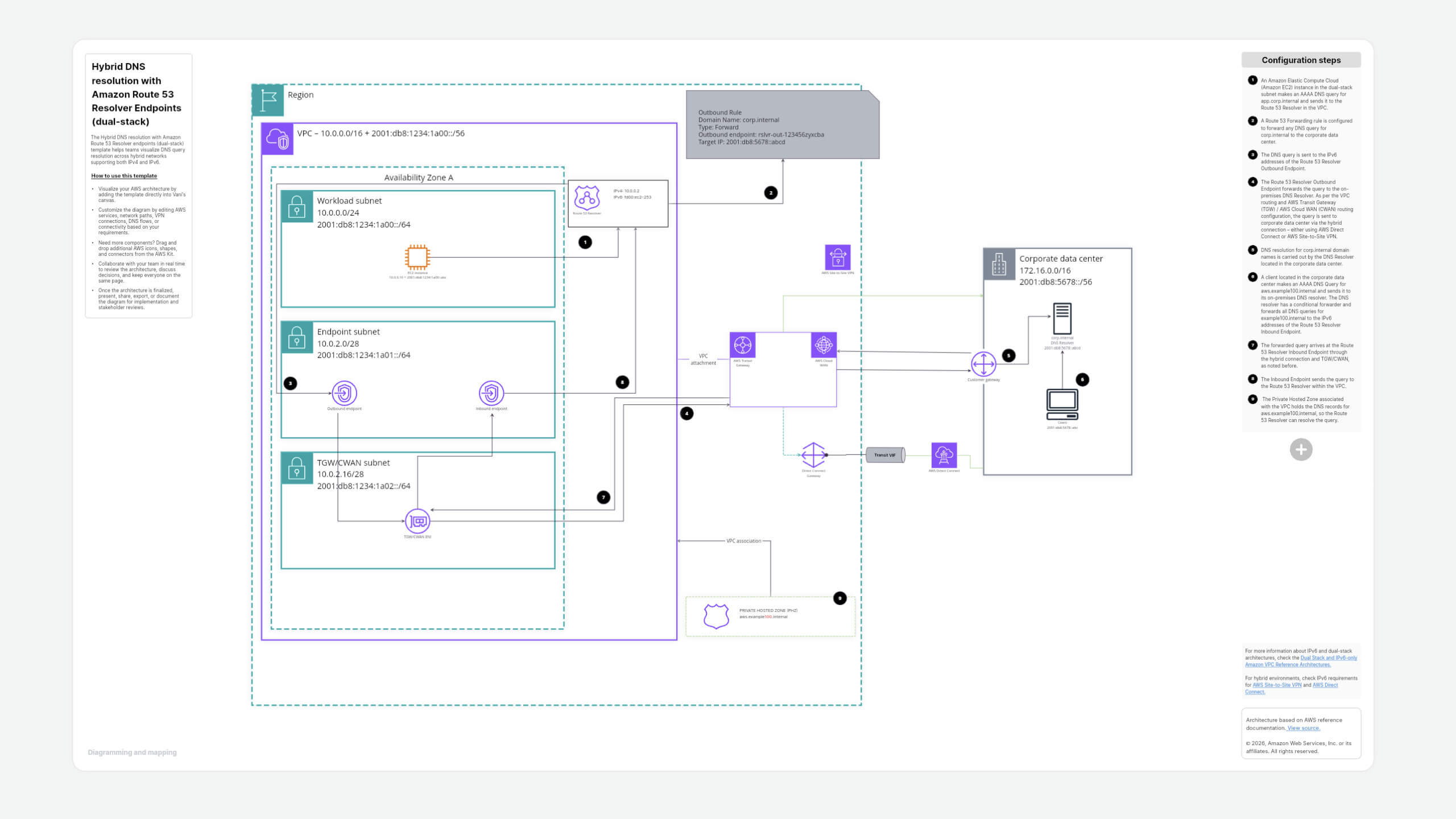
The Hybrid DNS resolution with Amazon Route 53 Resolver endpoints (dual-stack) template helps teams visualize DNS query resolution across hybrid networks supporting both IPv4 and IPv6.
How to use this template
- Visualize your AWS architecture by adding the template directly into Vani's canvas.
- Customize the diagram by editing AWS services, network paths, VPN connections, DNS flows, or connectivity based on your requirements.
- Need more components? Drag and drop additional AWS icons, shapes, and connectors from the AWS Kit.
- Collaborate with your team in real time to review the architecture, discuss decisions, and keep everyone on the same page.
- Once the architecture is finalized, present, share, export, or document the diagram for implementation and stakeholder reviews.
Why use this template in Vani
Make AWS architecture planning easier with Vani’s visual workspace.
- Visualize your architecture: Map AWS services, connections, and data flows clearly on an infinite canvas.
- Plan with your team: Add tasks, notes, and ideas around the architecture to plan the next steps.
- Build and customize: Use the AWS Kit, shapes, and connectors to expand the architecture as your requirements grow.
- Collaborate in real time: Review the architecture, share feedback, and make decisions together on the same canvas.
- Keep everything together: Bring your architecture, discussions, planning, and documentation into one visual workspace.
- Present and share easily: Turn your completed architecture into a clear visual for technical and stakeholder reviews.
When to use this template
Use this template when you want to:
- Understand an AWS architecture visually.
- Plan or design a similar AWS setup.
- Customize an AWS reference architecture for your environment.
- Review architecture with your cloud or IT team.
- Document your AWS infrastructure for future reference.
FAQs
Yes. You can edit the existing components and connections or add new ones to match your architecture.
Yes. Use the AWS Kit to add AWS icons, services, and other components to your diagram.
Yes. You can collaborate with your team in Vani to review the architecture, discuss changes, and work together in real time.
Yes. The template can be used as a starting point for planning, reviewing, and documenting your AWS architecture. Customize it based on your specific requirements.
Yes. Once your architecture is ready, you can share or export it for presentations, documentation, and stakeholder reviews.
The template is based on AWS reference documentation. It is provided as a visual starting point and should be adapted to your specific requirements. For complete technical details, refer to the original AWS source.
Vani offers paid template collections for AWS, ERD, and Azure. You’ll also find a range of free templates for brainstorming, planning, diagramming, and team collaboration.